UiPath Conversion of "Sharepoint Scope and Get File"
UiPath Conversion of "Sharepoint Scope and Get File". This is a very common set of activities in UiPath. In Power Automate Desktop this needs to be implemented using the Sharepoint Cloud action "Get…

Updated
by Tony Higgins
UiPath Conversion of "Sharepoint Scope and Get File"
This is a very common set of activities in UiPath. In Power Automate Desktop this needs to be implemented using the Sharepoint Cloud action "Get file content using path", along with two other PAD actions. An example of the resulting PAD action sequence will look like this:
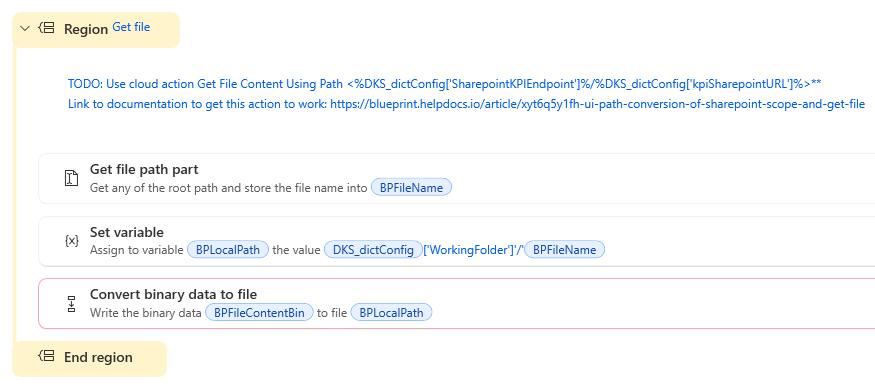
Being a Cloud Action, Blueprint is unable to automatically generate the "Get File Content Using Path" action into the PAD flow. So in place of that step Blueprint generates a TODO comment containing the PAD Robin Code for that action. Here are the steps you need to perform to finalize this solution:
- Open the TODO comment and expand it to see all of the content. Copy the Robin Script as shown below:
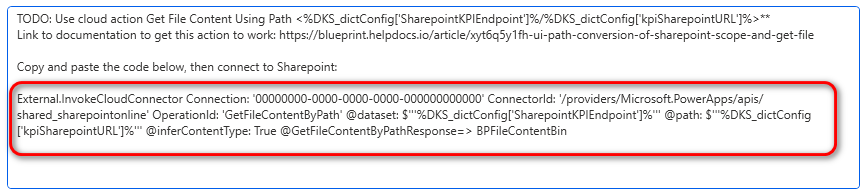
- Select the PAD action following the TODO comment and paste the above Robin script. This creates a new Share Point Cloud action called "Get File Content using path". It should also resolve the compiler error on the last action "Convert binary data to file"
- Lastly, open the "Get File Content using path" action and set the Connection Reference
After performing these steps your solution should be complete with no compile errors.
How did we do?
Setting up SAP for RPA