Understanding Wrapper Subflows in Power Automate Desktop
You may notice what appears to be extra "Run Subflow" actions in your migrated process. Rest assured, Blueprint migrates flows faithfully. We do not introduce unnecessary subflow calls. Subflows star…

You may notice what appears to be extra "Run Subflow" actions in your migrated process. Rest assured, Blueprint migrates flows faithfully. We do not introduce unnecessary subflow calls. Subflows starting with "w" are Wrapper Subflows, which are created to support argument passing when the source process requires it.
Why Wrapper Flows Exist
In Power Automate Desktop, when a subflow is called using the "Run Subflow" action, there is no native way to pass arguments. Blueprint creates wrapper flows to handle argument passing for subflow calls that meet certain conditions, ensuring the migrated process functions correctly.
For example, in the image below: if Main calls Subflow A, and Subflow A calls Subflow B, and each call passes more than five arguments, two wrapper flows will be created.
Calls with five or fewer arguments are handled inline within the subflow itself and no wrapper is created.
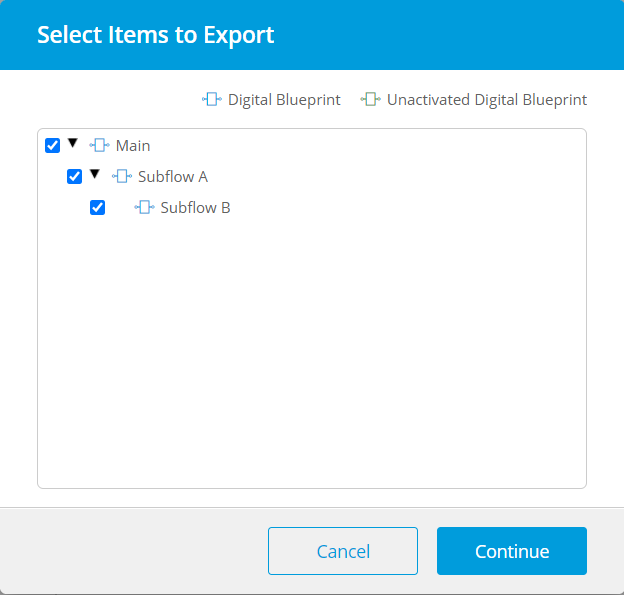
Wrapper Functions
Wrapper Flows will be run before the subflow being called. It initializes variables, sets argument values, and then calls the target subflow. If the arguments used are exactly the same for multiple calls, the same wrapper will be reused.
Wrappers server 3 important functions
- Variable Initialization - Initializes internal variables from the source RPA tool. If no default value exists, the variable is set to NULL.
- Argument Assignment (Input/Output) - Assigns input and output argument values for the subflow call.
- Subflow Execution - Calls the target subflow as its final step
Naming Conventions
Wrapper flow names follow a consistent pattern based on the calling flow's name.
General Rules:
- All wrapper names start with "w".
- A prefix based on the caller flow's name follows the "w"
- The called subflow's name appears after the prefix
Prefix Rules:
Scenario | Prefix Logic |
Main is calling a subflow | No additional prefix (just "w") |
Called subflow name has multiple words separated by special characters (e.g., underscores) | "w" + First 2–3 letters of each word |
Called subflow name is a single word in camelCase | "w" + First 2–3 uppercase letters |
Called subflow name has only one uppercase letter or is all lowercase | "w" + First 2-3 letters of the flow name |
Flow name starts with a special character or number | "w" + Underscore added as prefix |
Examples:
Caller Subflow | Called Subflow | Wrapper Name |
Subflow_A | Subflow_B | wSA_SubflowB |
subflow_a | subflow_b | wSA_SubflowB |
subflowa | subflowb | wSUB_subflowb |
Main | _5550 Subflow | w__5550 Subflow |
_5550_Main_Process | Extract_Data | wMP__Extract_Data |
wSA_SubflowB, w1SA_SubflowB, w2SA_SubflowB).Example
For an extremely detailed example showing how Blueprint faithfully migrates subflow calls from Blue Prism to Power Automate Desktop, please download and review the attached PDF.
How did we do?
Why We Create Multiple Similar Subflows During Migration
Setting up defaultRunDotNetScriptReferences