Home & Global Resources
Blueprint Assess
Blueprint Migrate
Getting Started
The Blueprint User Interface
Change Your Password
Open a Project
Organize Artifacts and Assets
Close a Project
Status Indicators
Jobs
Exporting from Source RPA Tools
How to export a UiPath Automation Project from UiPath Orchestrator
How to export .bprelease files from Blue Prism
Blue Prism VBO Matching on Import
How to Export .zip files from Automation A360 Control Room
Importing
Exporting
RPA Export from Blueprint
Variable Prefixing
Why We Create Multiple Similar Subflows During Migration
Understanding Wrapper Subflows in Power Automate Desktop
Setting up defaultRunDotNetScriptReferences
AsEnumerable Support
XmlDocument Support
Bulk Reimport/Recalculate
Metabot Migration - Best Practices
Exporting Reusable Flows
Artifacts Management
Base Artifact Types
Creating and Managing Artifacts
Utility Panel
Using Descendants View
Global Actions
Rules
Rules Overview
Rule Pre-Requisites
Using Rules
Rules User Interfaces
Using the Rules Table
Using Rules CSV
Using the Rules Wizard
Custom Action Mapping
Reuse Mapping to Power Automate Desktop
Manual Reuse
TODO, Error, and Robin Mapping
Script Mapping
Variable Name Dependency Mapping
Variable Renaming and Initialization
DLL/Method Invocation Mapping
Unresolved References
Work Queues Mapping
Solutions & Best Practices
Working with Migration Output in Power Automate Desktop (PAD)
Blueprism to PAD Migration Output Details
UiPath to PAD Migration Output Details
A360 to PAD Migration Output Details
RPA Value-Mapping Assessments
Why Choose Blueprint Cloud vs. On Premise ?
Setting up SAP for RPA
UiPath Conversion of "Sharepoint Scope and Get File"
API & Developer Resources
REST API Request Header and Parameters
REST API Request Body and Parameters
REST API - Listing Artifacts in the Request Body
REST API - Defining an Artifact in the Request Body
REST API - Defining a Comment in the Request Body
REST API - Defining a Reply in the Request Body
REST API - Defining a Trace in the Request Body
REST API - Filter Parameter
REST API - Defining a User in the Request Body
REST API Requests
REST API - Add Attachment to Subartifact Request
REST API - Get Artifact Request
REST API - Add Traces Request
REST API - Get Project by Id Request
REST API - Update Custom Choice-Property Type Request
REST API - Publish Comments Request
REST API - Publish Artifact Request
REST API - Update Comment Request
REST API - Delete User Request
REST API - Add Comment Request
REST API - Close Review Request
REST API - Get Discussion Status Request
REST API - Update Reply Request
REST API - Get Attachment Request
REST API - Delete Comment Request
REST API - Create Project Request
REST API - Get Group Request
REST API - Rate Comment Request
REST API - Get Child Artifacts of Artifact Request
REST API - Discard Artifacts Request
REST API - List Artifacts Request
REST API - Rate Reply Request
REST API - Move Artifact Request
REST API - Delete Attachment Request
REST API - List Projects Request
REST API - Get Blueprint Product Version Request
REST API - Update Standard Choice Property Request
REST API - Get Review Request
REST API - Reply to Comment Request
REST API - Update User Request
REST API - Get Collection Request
REST API - Delete Artifact Request
REST API - List Collections Request
REST API - Authenticate Request
REST API - Get Artifact Type Request
REST API - List Artifact Types Request
REST API - Delete Reply Request
REST API - Get Root Artifacts of Project Request
REST API - Add Attachment Request
REST API - Create User Request
REST API - List Reviews Request
REST API - List Groups Request
REST API - Get User Request
REST API - Delete Traces Request
REST API - Add Artifact Request
REST API - List Users Request
REST API - Get Artifact Image Request
REST API - Update Artifacts Request
REST API - List Unpublished Artifacts Request
REST API HTTP Methods
REST API - HTTP HEAD Method
REST API - HTTP DELETE Method
REST API - HTTP GET Method
REST API - HTTP POST Method
REST API HTTP Status Codes
REST API - HTTP PATCH Method
Blueprint REST API
REST API Quick Start Example
REST API Requests and Responses
REST API Security and Authentication
REST API Known Issues & Constraints
REST API Requests
REST API Resources
REST API - Defining an ALM Job in the Request Body
Dashboards & Reports
Statistics Report Options
Using Scope and View
Statistics Dashboard
Statistics Reports
Applications Dashboard
Applications Report
Estimator Dashboard
Estimator Reports
How to Change the Main Process Label for Estimations
Bulk Reporting
Call Trees
Blueprint + PowerBI Dashboards
How to Create Microsoft Power Automate RPA Migration Estimates with Blueprint
Assessment Report
Licensing
Settings & Administration
Overview of Blueprint Settings
System Reports
System Reports
License and Activity Reporting
User List
Project Activity
User Roles
Artifact Map
Project Usage
User Activity Report
Audit Log
System Logs
User Management
Creating and Managing Users
Creating and Managing Groups
Creating and Managing Instance Administrator Roles
Creating and Managing Project Administrator Roles
RPA Management
Microsoft 365 Authentication Settings
Integration Reporting
Migrate - Import/Export
Migrate - Dashboards
Migrate
Analyze
Automation360 Authentication Settings
GenAI
Advanced Settings
Projects
Installation
Blueprint Installation Guide
System Requirements
Supported Third-Party Components
Azure App Registration (Power Automate Export)
Release Notes
Table of Contents
- All Categories
- Blueprint Migrate
- Exporting
- Exporting Reusable Flows
Exporting Reusable Flows
Blueprint supports exporting processes as individual, reusable desktop flows. When using this feature, Blueprint will: Export each action or process as a separate PAD flow that can be referenced by a…

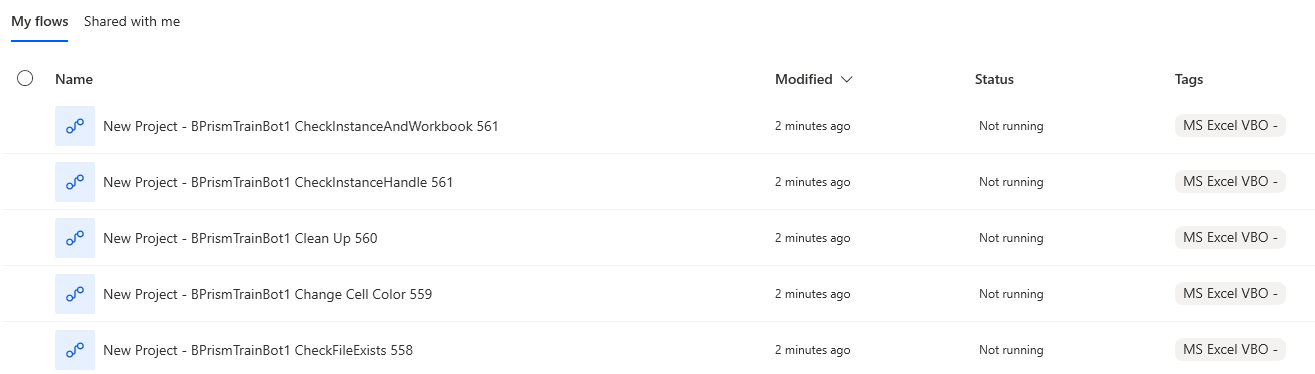
Blueprint supports exporting processes as individual, reusable desktop flows. When using this feature, Blueprint will:
- Export each action or process as a separate PAD flow that can be referenced by any other flow
- Tag each exported flow for easy filtering and organization within PAD
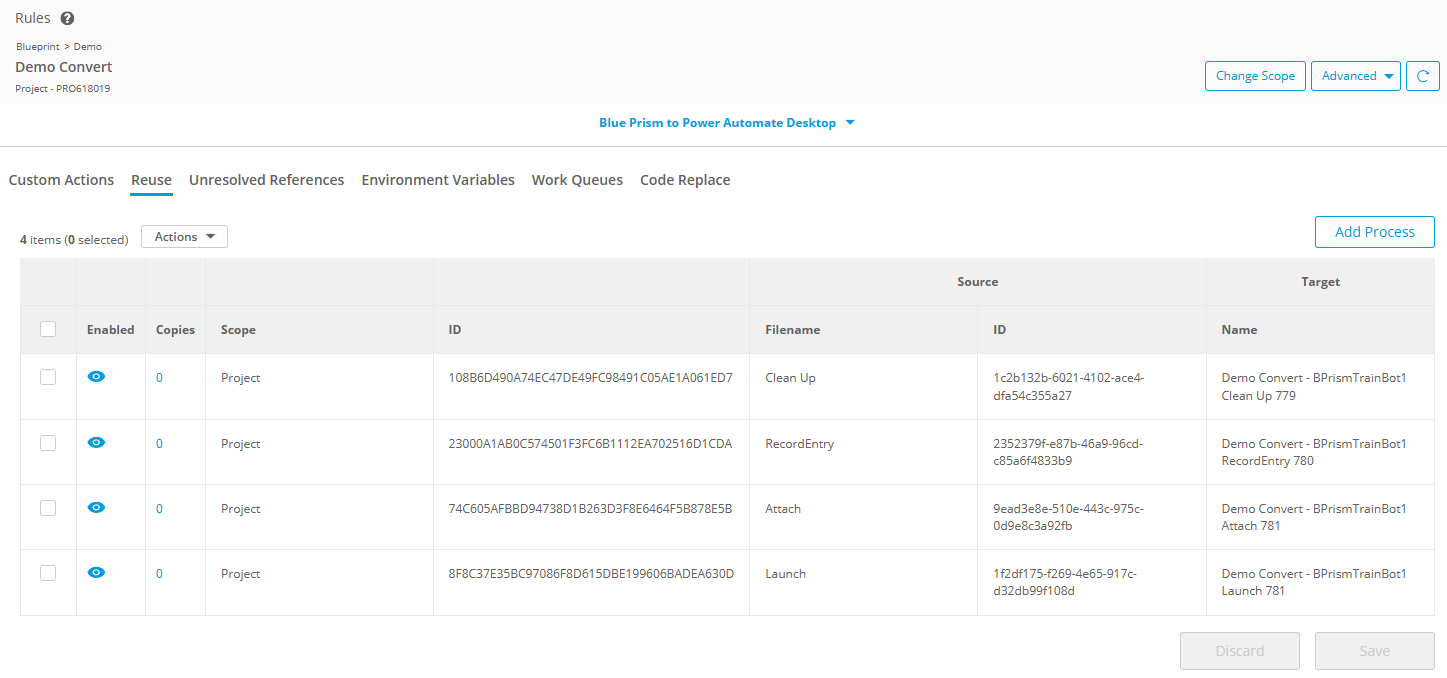
- Create Reuse Rules for each exported flow so that future migrations automatically reference them
- Convert any calls between exported flows into "Run Flow" calls
Blue Prism — Export as VBO
This feature preserves the concept of VBOs after conversion to PAD. Each action within the VBO is exported as an individual PAD flow, tagged with the VBO name so all actions remain grouped and discoverable in PAD's filter view
To use this feature:
- In the Project Explorer, select and activate the root process of the VBO, if not already activated. This is the process that shares the name of the VBO and is the parent of all VBO actions.
- Choose Export > Export as VBO
- Click Continue in the confirmation modal, then select any additional export options when prompted
This will create an export job that creates the tagged PAD flows for each VBO action, and creates the associated Reuse Rules for each action.
UiPath & A360 — Export as Library
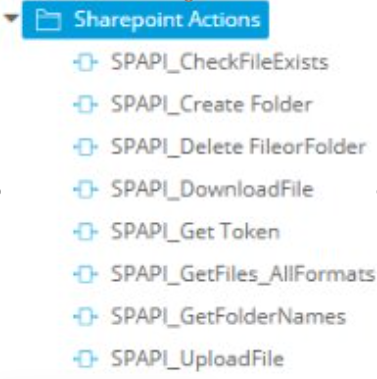
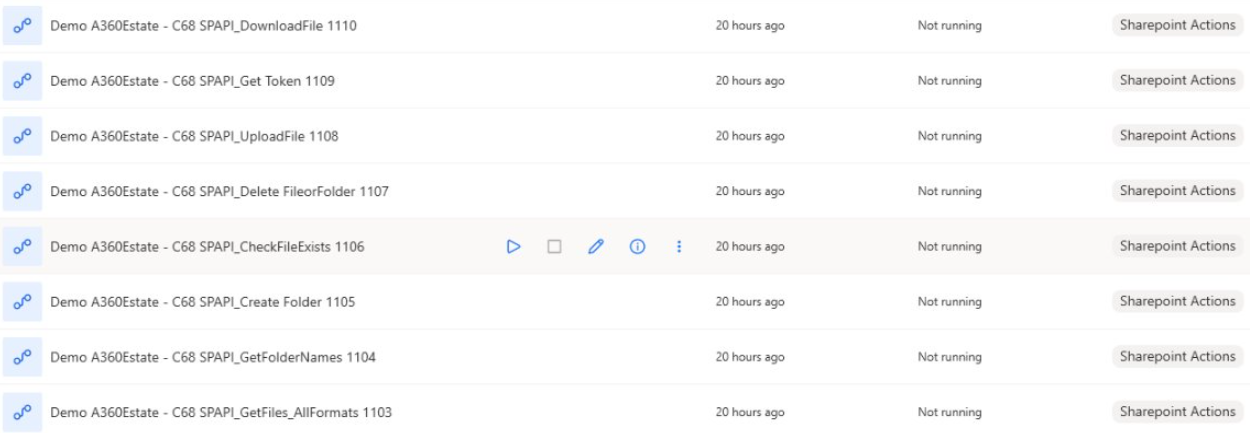
For UiPath and A360 artifacts, any folder or process can be exported as a library. Each Blueprint process within the selected folder or process is exported as a separate PAD flow and tagged for grouping.
To use this feature:
- In the Project Explorer, select the desired UiPath or A360 folder or process artifact
- Choose Export > Export as Library
- Click Continue in the confirmation modal, then select any additional export options when prompted
This will create an export job that creates the tagged PAD flows for each action, and creates the associated Reuse Rules for each action.
Tagging behavior: Tag values are determined by the source platform:
- UiPath — the namespace value is used as the tag
- A360 — the folder name is used as the tag
How did we do?
Metabot Migration - Best Practices